Third Grade PNG and 3rd Back to School SVG: Practical Digital Assets for Educators, Crafters, and Small Businesses
Back-to-school season isn’t just about sharpened pencils and fresh notebooks—it’s a pivotal moment for creative expression, classroom identity, and small-business opportunity. At the heart of that momentum are versatile digital design assets like Third Grade PNG and 3rd Back to School SVG files. These aren’t generic clipart or low-resolution web graphics. They’re production-ready, professionally formatted files built for real-world application across education, DIY crafting, print-on-demand, and small-scale retail.
What Makes These Files Stand Out From Standard School-Themed Graphics?
Most school-themed designs you find online fall into one of two categories: overly simplistic (think cartoonish fonts and pixelated outlines) or overly complex (layered illustrations that don’t scale cleanly). The Third Grade PNG and 3rd Back to School SVG collection bridges that gap with intentional technical precision and thoughtful design intent.
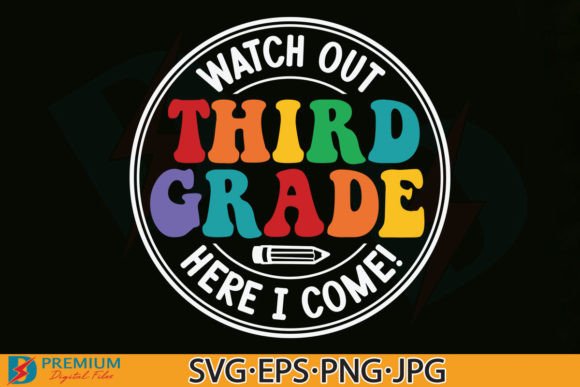
Each file is purpose-built—not just drawn, but engineered—for compatibility, flexibility, and fidelity. That means no guessing whether your Cricut Design Space will recognize layers, no frustration resizing a JPG only to see jagged edges, and no wasted time removing backgrounds manually. The package includes seven distinct file types, each serving a specific role in different workflows:
- 2 PNG files at 300dpi with transparent background — ideal for layering over photos, adding to digital lesson plans, or placing on mockups for social media previews;
- 1 PNG optimized for Cricut and Silhouette machines — pre-processed with clean vector-like edges and consistent transparency, eliminating common cut-line errors;
- 1 JPG at 300dpi on white background — ready for quick use in newsletters, printed handouts, or email signatures where transparency isn’t needed;
- 1 EPS vector file — fully scalable without quality loss, compatible with Adobe Illustrator, CorelDRAW, and professional print services;
- 1 SVG Group file — all elements locked together as a single object, perfect for users who want to resize or recolor the entire design at once;
- 1 SVG Ungroup file — every letter, icon, and decorative element separated, enabling granular editing—swap colors per shape, rearrange layout, or delete individual components.
This level of file diversity reflects deep understanding of how people actually work—not how software manuals say they should. A teacher preparing bulletin board materials may reach for the transparent PNG first; a small-batch tumbler seller will open the ungrouped SVG to adjust spacing between “3rd Grade” and the apple icon; a graphic designer building a school-branded merchandise line will rely on the EPS for large-format vinyl printing.
Real-World Applications Across User Groups
The strength of Third Grade PNG and 3rd Back to School SVG lies not in their visual charm alone—but in how seamlessly they integrate into varied daily practices.
Educators Building Classroom Culture
From kindergarten through fifth grade, teachers curate physical and digital spaces that signal belonging and academic identity. A well-placed “Welcome to Third Grade!” banner—printed from the high-res JPG or cut from vinyl using the Cricut-optimized PNG—becomes more than decoration. It anchors routines, supports visual schedules, and reinforces grade-level expectations. When embedded in Google Slides or Canva presentations, the transparent PNG version maintains clarity over any background color or image, ensuring accessibility for students with diverse learning needs.
Crafters and Makers Scaling Their Output
Hobbyists turning passion into side income often hit bottlenecks around consistency and efficiency. With the ungrouped SVG, a sticker maker can quickly isolate the pencil icon and apply a metallic foil effect in Silhouette Studio before cutting—while keeping the text intact for another batch. A pillow entrepreneur can import the EPS into a DTG (direct-to-garment) printer workflow and scale the design to fit toddler-sized throw pillows without re-rasterizing or losing edge sharpness. No extra plugins. No third-party converters. Just native compatibility.
Small Business Owners Launching Seasonal Collections
Back-to-school represents one of the top three annual retail windows—second only to holidays and back-to-college. For shops selling mugs, tumblers, tote bags, or custom stationery, timing and relevance matter. Using the 3rd Back to School SVG, a shop owner can produce five variations in under an hour: a minimalist black-and-white version for Instagram ads, a pastel-colored variant for Etsy listings, a version with added confetti for email headers, and two alternate layouts—one emphasizing “3rd Grade,” another highlighting “Back to School.” All derived from the same source files, preserving brand cohesion while maximizing platform-specific appeal.
Technical Considerations You Should Know Before Use
These files are powerful—but power requires awareness. Compatibility isn’t universal, and assumptions can derail projects. Here’s what to verify before downloading or deploying:
- Cricut Design Space accepts both grouped and ungrouped SVGs, but older versions may not render nested groups correctly. Always test with the ungrouped version if you plan to edit individual letters or icons.
- Silhouette Studio requires the Designer Edition or higher to open SVG files natively. The included PNG for cutting is optimized for Basic Edition users who need reliable cut lines without upgrading.
- Adobe Photoshop handles PNGs flawlessly—but remember: transparency is preserved only if you avoid flattening layers or saving as JPEG after editing.
- Print services (like Printful or local screen printers) typically prefer EPS or high-res PDFs. The included EPS eliminates conversion risk and ensures Pantone-matching accuracy for branded apparel.
- Web use benefits most from the transparent PNGs—but always compress them with tools like Squoosh or TinyPNG before uploading to CMS platforms to maintain fast load times.
Also note: this is an instant download digital product. There’s no physical item, no shipping delay, and no inventory tracking. That immediacy serves educators preparing last-minute materials and entrepreneurs responding to seasonal demand spikes—but it also means buyers must confirm software readiness upfront. No refunds are issued for incompatibility issues that stem from unverified system requirements.
Why File Structure Matters More Than Aesthetic Alone
Aesthetics draw attention. File architecture sustains utility. Consider this scenario: a homeschool parent wants to adapt the “3rd Back to School SVG” for a child with dyslexia. They need to increase letter spacing, change the font to OpenDyslexic, and add tactile markers. With the ungrouped SVG, that’s possible—each character is editable. With a flattened PNG? It’s impossible without recreating the entire design from scratch.
Or imagine a district communications team designing a series of grade-level welcome posters. They need identical styling across K–5—but each poster must reflect appropriate developmental language and imagery. Starting from the Third Grade PNG gives them a proven baseline: balanced weight distribution, legible hierarchy, and age-appropriate iconography. They can then replicate its spacing logic and color contrast ratios in subsequent grades—ensuring visual continuity without reinventing layout principles.
That’s the quiet advantage of thoughtfully structured digital assets: they reduce cognitive load, support inclusive adaptation, and serve as reliable scaffolding—not just decorative flourishes.
Final Thoughts on Integration, Not Isolation
Design files like these succeed not because they’re “cute” or “trendy,” but because they operate reliably inside existing systems. Whether you’re a third-grade teacher laminating name tags, a retired art educator launching a craft blog, or a startup founder developing a line of STEM-themed classroom supplies—the Third Grade PNG and 3rd Back to School SVG collection offers interoperability without compromise.
They respect your time by eliminating repetitive prep work. They respect your audience by supporting accessibility-first adaptations. And they respect your goals—whether that’s building community, launching a micro-business, or simply making learning feel intentional and joyful.
When you unzip the archive, you’re not just opening seven files. You’re unlocking a set of tools calibrated for clarity, consistency, and real-world execution—ready to move from screen to shelf, lesson plan to lunchbox, idea to impact.