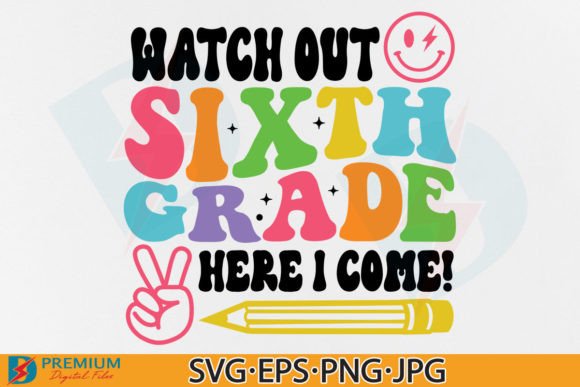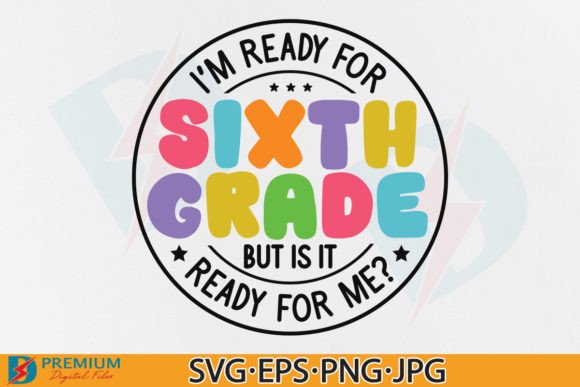
Sixth Grade PNG & 6th Back to School SVG
Whether you’re prepping a classroom bulletin board, launching a small merch line for middle schoolers, or designing personalized back-to-school gifts for your own child, Sixth Grade PNG and 6th Back to School SVG files offer versatile, ready-to-use design assets—no illustration skills required. These aren’t generic clipart packs; they’re thoughtfully prepared digital files built for real-world use across crafts, education, and small business projects.
What You’re Actually Getting (and Why It Matters)
The download delivers one ZIP file with seven distinct assets—each serving a specific purpose:
- Two high-resolution PNGs (300dpi, transparent background) — ideal for layering over photos, adding to digital lesson slides, or importing into Canva or PowerPoint without white borders.
- One PNG optimized for Cricut and Silhouette machines — pre-processed for clean cutting with no extra tracing or cleanup needed.
- One JPG (300dpi, white background) — perfect for quick social media posts, printable handouts, or email newsletters where transparency isn’t necessary.
- One EPS vector file — scalable to any size without quality loss, great for professional print shops or designers who need editable paths in Illustrator.
- Two SVG versions (grouped and ungrouped) — both compatible with Cricut Design Space. The grouped version saves time for simple cuts; the ungrouped version lets you recolor individual elements—like turning a pencil icon blue while keeping the “6th Grade” text gold.
This variety means you don’t have to choose between simplicity and flexibility. A teacher can drop the PNG straight into a Google Slides deck. A tumbler shop owner can import the SVG into Cricut Design Space and resize it for a 20oz cup in under a minute. A freelance designer might open the EPS in Illustrator to adjust stroke weights before handing off to a client’s printer.
Different Needs, Different Priorities
How much you’ll value each file type depends on your tools, goals, and experience level—not just what’s included.
For Teachers & Educators
You likely care most about speed, clarity, and classroom appropriateness. A transparent PNG works instantly in digital assignments or printed name tags. No need to wrestle with layers or software compatibility. You won’t be editing vectors—but having a crisp, readable “6th Grade” graphic helps reinforce identity and belonging at the start of the year. Bonus: the white-background JPG prints cleanly on standard copy paper for hallway displays or student handouts.
For Hobbyists & Parents
If you’re making custom water bottles or iron-on shirts for your child’s first week of middle school, ease of use is key. The Cricut-optimized PNG and SVG files mean you can skip tutorials and get cutting—especially if you’ve used Cricut Design Space before. The ungrouped SVG gives you freedom to tweak colors or hide elements (say, remove the graduation cap if your school doesn’t use that imagery). And because it’s an instant download, you can order materials the same day you decide to make something.
For Small Business Owners & Makers
Reliability and scalability matter more here. You’ll want the EPS file for vendor submissions—many screen printers and embroidery digitizers require vector formats. The 300dpi resolution ensures sharp results on mugs, tote bags, or vinyl decals—even at larger sizes. And since the design is clean and legible at small scales, it works on sticker sheets or notebook covers without blurring. Just remember: this is for physical products only. You can’t resell the file itself, but you *can* use it to create and sell finished items like “6th Grade Survival Kit” tumblers or “Official 6th Grader” pillowcases.
For Designers & Freelancers
You’ll appreciate the intentional file structure—not just the formats, but how they’re prepared. The grouped vs. ungrouped SVG distinction shows attention to workflow. The EPS isn’t just exported—it’s clean, with minimal anchor points and consistent naming. That saves time when adapting the asset for a client’s brand palette or integrating it into a larger layout. If you’re building a seasonal collection (e.g., grade-level bundles from K–8), this file fits neatly alongside others—consistent style, consistent technical quality.
What to Check Before You Download
These files are practical—but only if your setup supports them. Here’s what to verify:
- Cricut users: Confirm you’re using Design Space (not older Cricut Craft Room software) and that your machine model supports SVG imports (all current models do).
- Silhouette users: Make sure you’re on Silhouette Studio Designer Edition or higher—basic edition doesn’t support SVG.
- Print-on-demand sellers: Check your platform’s accepted formats. Some require PNG with specific dimensions or bleed; others accept EPS directly.
- Beginners: If you’ve never opened an SVG before, try importing the ungrouped version into Design Space first—it’s forgiving and visual. Save the EPS for later, once you’re comfortable with vectors.
No software? No problem—you can still use the JPG or PNG in free tools like Google Docs, Canva, or even Microsoft Word. They’re not just for crafters.
Real Projects, Real Results
A homeschool parent used the transparent PNG to label plastic bins for her child’s new study station—“6th Grade Math,” “Science Lab Supplies,” “Reading Journal.” She resized it in Canva, added color blocks behind the text, and printed on sticker paper.
A PTA volunteer created a set of 50 “Welcome to 6th Grade!” bookmarks using the ungrouped SVG—changing the font color to match school colors and adding a small star icon from their existing library.
A local coffee shop ran a “Rising 6th Graders Get 10% Off” promotion and printed the white-background JPG onto coasters and window clings—no design tweaks needed.
None of these required advanced skills. All relied on matching the right file to the right tool—and knowing what each format does best.
Is This Right for Your Next Project?
Ask yourself:
- Do you need a clean, recognizable “6th Grade” visual—without designing from scratch?
- Will you use it for physical items (shirts, mugs, stickers) or digital ones (slides, newsletters, social graphics)?
- Do you already own or plan to use Cricut, Silhouette, Canva, Illustrator, or similar tools?
- Is consistency important? (e.g., matching other grade-level designs in a series)
If you answered yes to two or more, this set fits. It’s not flashy—but it’s dependable, well-structured, and built to move from download to finished project without friction. And because it’s digital and instant, there’s no waiting, no shipping cost, and no guesswork about whether the image will print clearly.
It won’t replace your creativity—but it might give you back an hour this week. And sometimes, that’s exactly what back-to-school season needs.