Welcome Back to School Sticker SVG
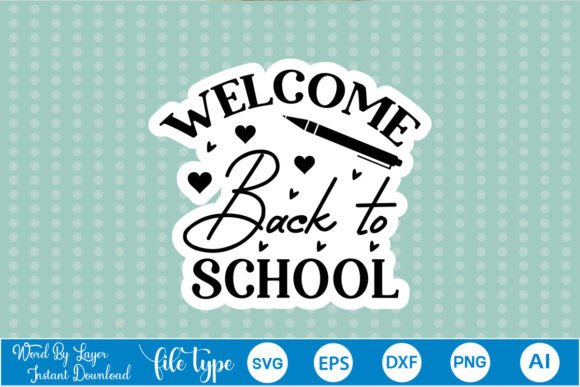
A Welcome Back to School Sticker SVG is a digital vector design file intended for use with cutting machines and graphic software. It features layered text—“Welcome Back to School”—formatted so each word appears on its own editable layer. This structure allows users to selectively hide, rearrange, recolor, or resize individual words without affecting the rest of the design. The file is delivered as a digital download only; no physical sticker or printed item is included.
This particular Welcome Back to School Sticker SVG package includes five distinct file formats: an SVG file optimized for Cricut Design Space, an EPS vector file for broad compatibility and editing, a high-resolution 300 DPI PNG with transparent background (ideal for print or digital overlays), a DXF file for CAD-based workflows, and an AI file—the native Adobe Illustrator source format. All files are organized and labeled consistently, supporting seamless use across platforms including Cricut, Silhouette Studio, Inkscape, Adobe Photoshop, and Adobe Illustrator.
People often seek a Welcome Back to School Sticker SVG for practical classroom preparation, personalized back-to-school gifts, or small-business product creation. Educators may use it to label student supplies, decorate bulletin boards, or create welcome signs. Parents might apply it to lunchboxes, notebooks, or backpacks. Crafters and small shop owners could integrate it into custom stickers, decals, or printable kits sold online. Its layered structure makes it especially useful when customization—such as omitting “Back” for a simplified “Welcome to School” message—is needed.
One key benefit is flexibility in production. Because the design is vector-based, it scales infinitely without loss of quality—whether cut at 2 inches for a laptop decal or enlarged to 12 inches for a classroom banner. The word-by-layer organization supports precise control over spacing, alignment, and color assignment per word, which is especially helpful when working with multi-material projects (e.g., different vinyl colors for each word) or adapting the layout to fit irregular surfaces.
However, there are tradeoffs to consider. While the layered SVG works well in Cricut Design Space, users must understand how to ungroup or select individual layers—steps not always intuitive for beginners. Some versions of Silhouette Studio require Designer Edition to fully unlock layer-editing capabilities in SVG files. Additionally, the DXF and EPS files, while editable in many vector programs, do not retain layer names or grouping logic as clearly as the native AI or SVG files. Users relying heavily on layer-specific edits should prioritize the AI or SVG versions.
Compatibility is broad but not universal. The included files support most mainstream tools, yet older versions of software—or web-based editors without vector import functionality—may not open EPS, DXF, or AI files reliably. PNG usage is limited to raster applications and lacks scalability for large-format cutting or printing. If your primary goal is simple one-time printing (e.g., on sticker paper via home inkjet), the PNG suffices—but if you plan repeated resizing, cutting, or color adjustments, the vector formats are essential.
This Welcome Back to School Sticker SVG is a strong fit if you regularly use cutting machines like Cricut or Silhouette and value granular control over text elements. It suits educators preparing multiple classroom materials, crafters building themed sticker bundles, or designers integrating school-related assets into larger branding projects. Its inclusion of both industry-standard vector formats (AI, EPS, DXF) and platform-optimized files (SVG, PNG) reflects thoughtful cross-software planning—not all sticker SVG packages offer this breadth.
Conversely, alternatives may be preferable in certain cases. If you need only a static, ready-to-print image—without cutting, resizing, or layer manipulation—the PNG alone would suffice, and a simpler, lower-cost download might meet your needs. If you work exclusively in Canva or other browser-based tools that lack robust SVG layer support, you may find the layered structure difficult to leverage fully. Similarly, if your project requires custom illustrations beyond typography (e.g., apples, pencils, or chalkboard textures integrated into the text), a more complex, graphically rich SVG—or a custom design service—would better serve that objective.
Another consideration is licensing. Since this is a digital download for personal and small-business use, commercial redistribution of the files themselves (e.g., reselling the SVG as-is) is typically prohibited. Always verify the seller’s terms—especially if you intend to use the design in products offered for sale. For scalable commercial reuse across many SKUs or client projects, a license upgrade or custom agreement may be necessary.
Practical decision-making starts with identifying your primary tool and use case. Ask yourself: Will I cut this with a Cricut? Then the SVG is your starting point. Do I need to adjust letter spacing in Illustrator for a custom layout? The AI file preserves full editability. Am I preparing print-and-go handouts for a PTA event? The PNG offers immediate usability. Matching file type to workflow avoids unnecessary conversion steps and preserves design integrity.
Also consider your comfort level with vector editing. If you’re new to layers, grouping, or path operations, allocate time to test the files in your preferred software before committing to a full project. Most platforms provide free tutorials on managing SVG layers—Cricut’s “Ungroup” and “Attach” functions, for example, behave differently than Silhouette’s “Release Compound Path.” Understanding those nuances ensures smoother execution.
In summary, this Welcome Back to School Sticker SVG delivers structured, multi-format utility for users who require both precision and adaptability in school-themed design work. Its layered approach supports intentional customization, while the range of included formats reduces software-related roadblocks. It is not a shortcut for users seeking plug-and-play simplicity—but for those who value control, consistency, and compatibility across tools, it provides measurable efficiency gains over generic, flattened alternatives.
If your goals involve repeatable, scalable, and editable school-related graphics—and you have access to compatible software or hardware—this package aligns well with those needs. If your requirements center on speed over customization, or if your tools lack support for layered vectors, evaluating simpler or more targeted resources may yield better results.