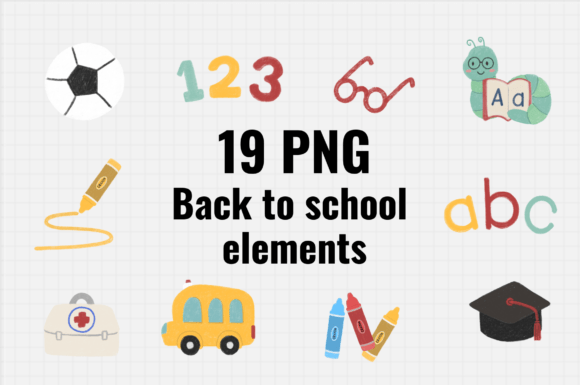
Chalk Style Back to School PNG Elements: Versatile, High-Resolution Assets for Creative Projects
Back-to-school season isn’t just about notebooks and backpacks anymore—it’s a creative moment. Teachers design classroom decor. Parents craft personalized welcome cards. Small business owners launch limited-edition apparel lines. Digital designers build themed Canva templates or Notion dashboards. At the heart of many of these projects? Chalk Style Back to School PNG Elements. These aren’t generic clipart files—they’re hand-crafted, high-fidelity digital assets built for flexibility, clarity, and charm.
What Makes These Chalk-Style PNGs Stand Out?
Each set includes 19 carefully curated PNG files, all sized at 2500 × 2500 pixels and rendered at 300 dpi. That resolution matters—not just for print, but for future-proofing your work. Whether you’re scaling down for an Instagram story or enlarging for a 12×12 scrapbook page, these files retain crisp edges and subtle texture. No pixelation. No fuzzy outlines.
The “chalk style” isn’t just a visual trend—it’s a deliberate aesthetic choice. Think soft grain, gentle shadows, slight smudging at the edges, and organic imperfections that mimic real chalk on a slate or sidewalk. It feels warm, approachable, and human—perfect for education-focused content where warmth and accessibility matter.
Unlike vector-based illustrations, these are raster PNGs with transparent backgrounds. That means zero clipping masks, no white boxes to delete, and seamless layering in Photoshop, Procreate, Canva, or even PowerPoint. Drop one onto a pastel gradient, a watercolor paper texture, or a photo background—and it integrates instantly.
Real-World Uses You’ll Reach For Again and Again
These Chalk Style Back to School PNG Elements were built for doing—not just decorating. Here’s how they fit into everyday creative workflows:
- Cards & Invitations: Design first-day-of-school welcome cards for students, parent-teacher meet-and-greet invites, or end-of-year appreciation notes. Layer a chalk-style apple over a kraft paper background, add handwritten text, and print on matte cardstock—the result feels tactile and intentional.
- Digital Planners & Note-Taking: Import into GoodNotes or Notability as custom stamps or dividers. A chalk-style pencil icon becomes a quick “to-do” marker; a chalkboard frame helps section off weekly goals. The transparency ensures clean integration with any notebook template.
- T-Shirt & Merch Design: Because they’re 300 dpi and 2500 px square, these files scale beautifully for screen printing or DTG (direct-to-garment) production. Pair a chalk-style “Class of 2025” banner with a vintage-inspired font, and you’ve got merch that stands out at PTA fundraisers or school spirit fairs.
- Classroom Decor & Bulletin Boards: Print full-size on sticker paper or vinyl for wall decals. Or use them digitally in Google Slides to build interactive morning meeting slides—drag-and-drop attendance charts, subject headers, or reward tokens that match your room’s cozy, analog-inspired vibe.
- Scrapbooking & Memory Keeping: Whether you’re documenting your child’s kindergarten year or archiving your own teaching journey, these elements add narrative texture. A chalk-style ruler beside a photo of first-day shoes? A chalk-drawn backpack holding printed journaling cards? It tells a story before a single word is read.
Why Resolution and Transparency Are Non-Negotiable
You might wonder: why insist on 2500 × 2500 px and 300 dpi? Because quality loss compounds quickly. Resize a low-res PNG up—even by 20%—and you risk blurriness or jagged edges. Shrink it down too far, and fine details like chalk grain or subtle shadow gradients vanish.
At 2500 px, you have breathing room. Need a 4×6 print? That’s only ~17% of the file’s native size. Designing for an 8.5×11 poster? Still under half-scale. And 300 dpi ensures every dot of ink lands precisely when printed—critical for sharp lettering in chalk-style banners or delicate line work in doodle borders.
Transparency isn’t just convenient—it’s essential for professional results. Without it, you’d spend minutes masking backgrounds in editing software. With it, you drop the element in, adjust opacity or blend mode if desired, and move on. Time saved adds up fast—especially when building a 20-page digital planner or prepping 50+ classroom posters before the bell rings.
Fitting Into Modern Creative Tools—Without Friction
These Chalk Style Back to School PNG Elements don’t require niche software or advanced skills. They’re compatible across platforms:
- Canva users drag and drop them directly into designs—no need to upgrade to Pro for background removal.
- Procreate artists import as layered PNGs, then recolor using adjustment layers or blend modes—ideal for customizing color schemes to match school branding.
- Teachers using Google Workspace insert them into Slides or Docs via “Insert > Image > Upload,” then resize freely without distortion.
- Small-batch crafters import into Cricut Design Space or Silhouette Studio at full resolution for precise cut lines—especially helpful when cutting chalk-style frames from vinyl or cardstock.
No hidden formats. No proprietary wrappers. Just clean, universally supported PNGs—ready when inspiration strikes.
Design Consistency Across Your Projects
One of the quiet superpowers of this set is cohesion. All 19 elements share the same hand-drawn weight, texture depth, and stylistic rhythm. That means your T-shirt design echoes your classroom door sign, which echoes your digital newsletter header—all without matching fonts or exact colors.
This consistency builds trust and recognition. Students notice the familiar chalk-style pencil on your weekly agenda slide—and associate it with structure and care. Parents see the same apple motif on your welcome card and your online class portal—and feel continuity between home and school.
It also saves decision fatigue. Instead of hunting for “just right” apples, rulers, and chalkboard corners across five different sites, you have a unified toolkit. That unity lets you focus on messaging, layout, and impact—not asset sourcing.
Smart Ways to Extend Their Lifespan
These aren’t seasonal throwaways. With smart reuse, they serve well beyond August:
- Recolor for holidays: Swap chalk-white for red-and-green tones to turn a “Back to School” banner into a “Back to Church Camp” or “Back to Homeschool Co-op” header.
- Mix with other textures: Overlay a light noise filter or subtle paper grain in Photoshop to make chalk elements feel like part of a physical collage—even in digital spaces.
- Animate selectively: In After Effects or CapCut, animate individual elements—like a chalk-style star “drawing itself” onto screen—to add motion to welcome videos or virtual orientation slides.
- Create variations: Use the eraser tool with low opacity to simulate “partially erased” chalk for playful interactivity—great for digital flashcards or quiz reveals.
Because they’re high-resolution and stylistically flexible, these Chalk Style Back to School PNG Elements grow with your needs—not against them.
What to Look for When Choosing School-Themed Assets
If you’re comparing sets, pay attention to three things: intentional imperfection, technical readiness, and scalable versatility. Generic “school clipart” often feels sterile or cartoonish. These Chalk Style Back to School PNG Elements lean into texture and humanity—without sacrificing polish. They arrive production-ready, not placeholder-ready. And because each file serves multiple roles (a chalk-style book can be a logo, a bullet point, or a watermark), they earn their place in your library—not just your August folder.
Whether you're designing for a single classroom or launching a small education brand, these 19 files offer more than decoration. They offer confidence, speed, and a quietly joyful tone—one that says, “Learning starts here—and it’s going to be thoughtful, handmade, and full of heart.”