Back to School Alphabet Book for Canva
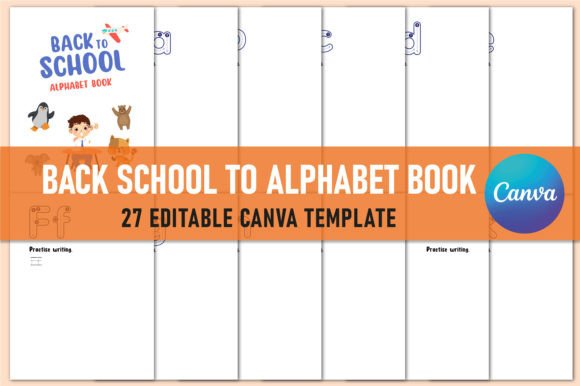
Whether you’re prepping a classroom for September, launching an educational blog, designing printables for your small business, or simply helping your child connect letters with school-themed concepts—the Back to School Alphabet Book for Canva is built to support real work, not just decoration. It’s not a generic font pack or clipart bundle. It’s a purpose-built, ready-to-use learning tool: 27 editable A–Z templates (one per letter, plus extras), delivered as high-resolution PDFs, JPGs, and PNGs—plus a live, editable Canva link you can open, tweak, and personalize in seconds.
What You Actually Get—and Why It Matters
This isn’t a single static file. It’s a complete production-ready kit:
- 27 unique alphabet templates—covering A through Z, with thoughtful extras like alternate “A” or “Z” designs for variety;
- Print-ready PDF files sized at 8.5 × 11 inches, set to 300 DPI and CMYK color mode—ideal for professional printing without color shifts or blurriness;
- JPG and PNG versions for digital sharing, social posts, or embedding into lesson slides;
- A fully editable Canva link—no design skills required. Swap fonts, change colors, update images, or add your own photos or logos in minutes;
- No bleed, no guesswork—clean margins mean what you see on screen prints exactly as intended.
That combination—print quality + digital flexibility + instant editability—is rare. Most alphabet resources force a trade-off: beautiful but uneditable, or editable but low-res. This one bridges both needs.
Educators Building Early Literacy
For preschool and kindergarten teachers, time is the most valuable resource. You don’t need to illustrate “B is for backpack” from zero. With this book, you can assign one letter per week, print a double-sided page for each student, and add your own handwriting practice lines or phonics prompts directly in Canva. The clean, friendly visuals hold attention without visual overload—especially helpful for neurodiverse learners who benefit from consistent layout and clear iconography.
Freelance Designers & Content Creators
If you sell digital downloads on Etsy or Gumroad, or create themed content for clients (e.g., back-to-school newsletters, teacher appreciation kits), this set saves hours—not just in design time, but in technical prep. You’re not exporting 26 files manually; they’re already optimized, named clearly (A_Alphabet_Page.pdf, B_Alphabet_Page.png), and structured for resale or bundling. Plus, the CMYK-ready PDF means your buyers won’t call you asking why their printed version looks washed out.
Small Business Owners & Bloggers
Running a tutoring service, Montessori co-op, or education-focused Instagram? You can use individual pages as storytime graphics, embed them in email sequences (“This week: ‘E is for Eraser’—download our free printable!”), or even adapt them into branded flashcards with your logo and color palette. Because the Canva link is editable, you’re not locked into someone else’s branding—you control tone, voice, and visual alignment.
Parents & Homeschoolers
You don’t need to be a designer—or even own a printer—to benefit. Open the Canva link on any device, duplicate the page for “M is for Math,” add your child’s name, insert a photo of their favorite pencil case, and download it as a PNG to share with grandparents or save to a learning journal. The simplicity removes friction between idea and action—something every busy caregiver appreciates.
What Priorities Shape Your Decision?
Not everyone values the same features—and that’s okay. Here’s how priorities shift across use cases:
- Ease of use matters most → Beginners, parents, or educators short on tech confidence will lean into the Canva link. No software installs, no layers to unlock, no font licensing worries.
- Print fidelity is non-negotiable → Teachers ordering class sets through school printers, or creators preparing physical products for sale, need CMYK + 300 DPI. Generic RGB web files won’t cut it.
- Commercial flexibility is key → If you plan to resell, bundle, or brand these pages, check usage terms. This kit permits commercial use—so long as you add your own value (customization, curation, integration).
- Creative control drives choice → Designers and marketers often skip rigid templates. But here, the editable Canva file gives room to experiment—swap icons, adjust spacing, layer text over illustrations—without breaking layout integrity.
- Speed + consistency win → Bloggers building a 26-day countdown series, or curriculum developers aligning letters with weekly themes, rely on uniform sizing, spacing, and style. No more resizing “Q is for Quilt” to match “R is for Ruler.”
Real Examples—Not Hypotheticals
• A first-grade teacher uses the “T is for Teacher” page as a welcome poster—replaces the default illustration with a photo of her smiling in front of her whiteboard, adds her name and room number, prints five copies, and hangs them around the hallway.
• A freelance graphic designer bundles six alphabet pages (A–F) into a “Back-to-School Starter Kit” for new tutors—adds her watermark, changes the header font to match her brand, and delivers it as a ZIP with instructions.
• A homeschool parent creates a laminated ABC ring: downloads all 26 PNGs, drags them into a Google Slides deck, adds tracing arrows using the line tool, exports as PDF, and sends to a local print shop.
• An edtech startup uses the “S is for Science” and “T is for Technology” pages as part of a free downloadable guide for STEM summer camps—embeds them in a Notion template alongside activity ideas.
Does This Fit *Your* Next Step?
Ask yourself:
- Do you need something that works today, not after a three-hour tutorial?
- Are you balancing digital sharing *and* physical handouts?
- Do you want consistency across all 26 letters—but also the freedom to make each feel personal?
- Is reliability more important than novelty? (No broken links, missing fonts, or blurry exports.)
If yes, the Back to School Alphabet Book for Canva meets those quiet, practical needs—without hype. It doesn’t promise to “transform your teaching” or “go viral.” It promises to be there when you open Canva, load the link, and start working—clearly, cleanly, and confidently.
If you find it useful, consider following the creator’s profile for updates. New seasonal variations, bilingual versions, or themed expansions (like “Science Alphabet” or “Kindness ABC”) often roll out to engaged users first—not as promotions, but as natural extensions of what people actually reach for, again and again.